Apple Maps Listings: Where Businesses Can Win Extra Visibility Without Extra Effort
Find out how businesses that optimize their Apple Maps listings now will gain a solid advantage in a space most competitors haven't even entered.


"Since we set up Apple Business Connect through Uberall, our presence across Apple apps including Maps, Wallet, and Messages has greatly improved. Our place cards look perfect. We have consistent information, consistent format, and great quality images.”

Key takeaways
- Apple Maps isn't a secondary listing — it's a full local search platform
- Most businesses haven't even claimed their Apple listing — and that's an opportunity for many local businesses
- A complete, optimized Apple Business profile powers visibility across the entire Apple ecosystem
"Hey Siri, where's the best Phở spot near me?"
"Best Phở restaurants in North Park, San Diego, for a quick business lunch"
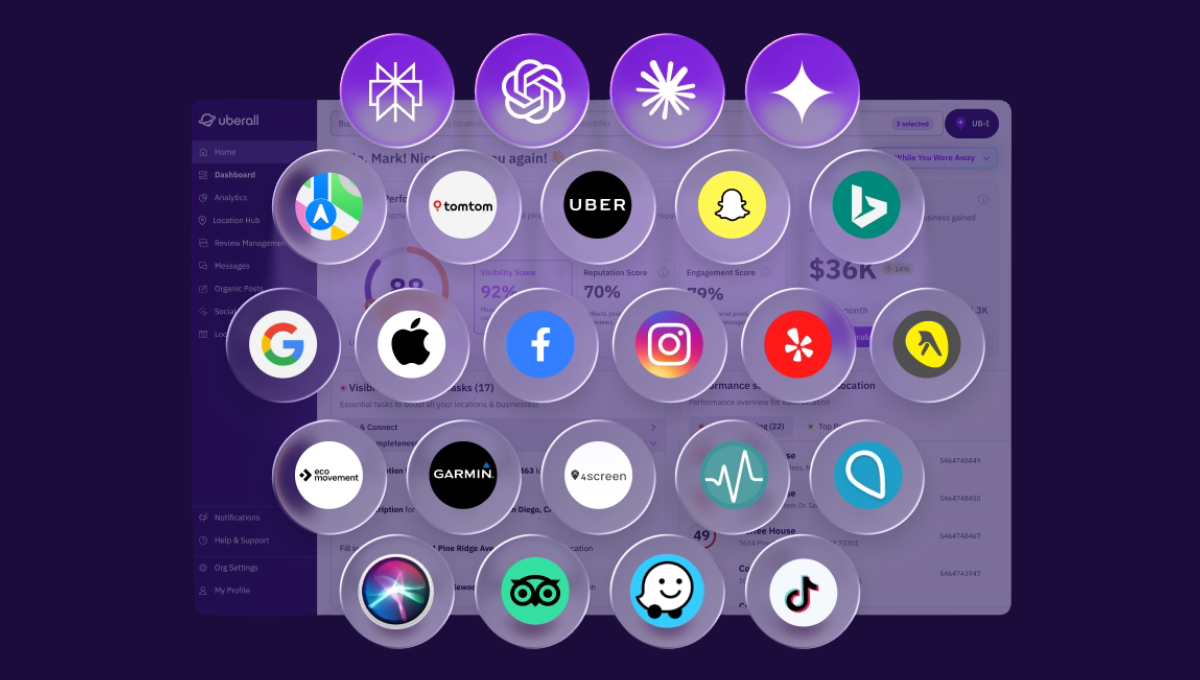
Whether consumers are asking ChatGPT, Google, or Siri about local recommendations (see above), your brand's online presence and content must be compelling enough for them to decisively book an appointment or tap on directions to visit you at that moment.
To book with or visit you, over local competitors – and it's worth noting these aren't always the competitors you have on your radar.
Most local businesses overlook the Apple ecosystem when they manage their business listings — it's a fair hesitation or oversight when everyone in SEO only talks about Google.
But with Apple Maps being the default navigation app on over 2.5 billion active Apple devices worldwide, it's not a niche audience. Apple Maps is what loads when these 2.5 billion users tap an address in Safari, ask Siri for directions, or search for a business through CarPlay.
So the next time Siri answers that customer question, let's make sure it's one of your locations that it recommends.

What Is the Advantage of Apple Maps Listings?
Whether you're an enterprise retail chain, a service-based tire business with multiple locations, or a nationwide bank with countless ATMs and branches, there's no getting around having a strong Google presence.
AI systems, after all, pull a lot of their information from top-ranked pages on the SERP and most-engaged-with Google Business Profiles.
But on Google, your locations' profiles are competing with ads, organic results, the Local Pack, and AI Overviews all at once. On Apple Maps, the place card is the experience, and there's less noise between the user's search and your business.
And unlike Google, where your competitors have been busy getting their hands dirty with optimizations for years, most businesses haven't touched their Apple Maps business listings at all. Yet. This means many of these listings are incomplete, outdated, or unclaimed entirely. Yet. Is there an opportunity to seize here? I would say so — and I would add that it's a significant opportunity.
Uberall has been an Apple publisher partner since 2013 — one of the first platforms to integrate Apple as a directory connection for multi-location brands. In that time, we've seen brands with hundreds of locations achieve up to 20% more direction clicks to their stores after optimizing their Apple Business profiles.

This isn't a post on how to claim or verify your Apple listings. Instead, I'm going to emphasize where local foot traffic and revenue opportunities can be won with Apple in the age of traditional and AI search — especially with Apple announcing some intriguing updates to their ecosystem.
Here are the advantages of Apple Business listings.
1. Apple’s Reach
How many people use Apple Maps? Well, Apple's market share in the mobile navigation market was around 25% when we last updated this article. More recent, reputable data doesn't seem to exist — Apple famously doesn't publish usage numbers.
What we do know with certainty is that there are more than 150 million active iPhones in the US, all with Apple Maps set as their default navigation app.
Apple Maps is famously not as popular in Europe; however, data tells us that Apple reached a record-high 27% market share across the pond in Europe in 2025. This means that roughly a quarter to a third of European smartphone users are on iPhones and therefore defaulting to Apple Maps.
Like I said before: This isn't a niche audience, and yet optimizing for the Apple ecosystem brings brands an exclusive channel to connect with potential local customers beyond Google. If you feel you've hit a wall with your Google strategy, Apple offers additional visibility — and another data source that AI systems can pull from when generating local business recommendations.
2. The Improved Siri & Visual Intelligence
Siri had 475 million active users in 2025. Another indicator we're not talking about a niche audience here.
Apple is overhauling Siri with large language model capabilities and building what's been reported as an AI-powered answer engine that will blend text, images, video, and local results across Siri, Safari, and Spotlight.
As Danny Goodwin wrote in Search Engine Land: "Apple's push into AI search could reshape how billions of queries are handled on iPhones. Visibility for brands and businesses won't just depend on Google rankings – it will depend on whether and how Apple's AI systems surface and summarize your content in voice and web answers."
Separately, Visual Intelligence already lets iPhone users point their camera at a storefront and instantly pull up business details, reviews, and hours. As these AI-driven features mature, they'll increasingly rely on structured, verified business data — the kind that lives in an optimized Apple Business profile.
Businesses that have already built out their listings with accurate information, quality imagery, and active Showcases will be the ones Apple's systems can confidently recommend — whether through Siri, Visual Intelligence, or whatever comes next.
3. Visited Places
The Visited Places Apple update uses on-device intelligence to automatically detect and save restaurants, shops, and other businesses that iPhone users visit. The phone recognizes where customers have been and logs it.
Users can then search their visit history, share favorite spots with friends, and see a "Visited" badge on listings they've been to before directly in search results. For businesses, this new feature is building retention into the Apple UX. One visit turns into a saved location, a "Visited" badge in future searches, and a recommendation waiting to happen.
4. Apple Maps Ads
Ads are coming to Apple Maps, starting in the US and Canada. A European launch date hasn't yet been announced.
Businesses with a claimed Apple Business listing will be able to run paid campaigns that appear at the top of Maps search results and within a new "Suggested Places" experience, in which searchers will be served recommendations based on trending nearby businesses, recent user searches, and relevance.
I would suspect that, with most competitors not even on the platform yet, early movers in North America will face less auction competition than on Google Ads — and perhaps lower costs while the market is still uncrowded and there for the taking.
How to Optimize Your Apple Maps Listing
Apple Maps ranks businesses based on relevance, proximity, reviews, and engagement — so every optimization you make directly influences where you appear in results.
We're seeing signs of the Apple ecosystem becoming a full local search platform, and it's nonnegotiable for businesses to expand their listings management strategy to Apple's platform. Those that do will enjoy a whole lot more reach and foot traffic … without necessarily doing a whole lot extra if you're already managing Google Business Profiles.
That's because Apple Business listings, like Google Business Profile listings, are free.
All businesses need to do is optimize their location performance at scale by claiming their listings and knowing how to update business info on Apple Maps.
1. Consistent Information
Most businesses get this wrong — because implementing consistent location data across multiple locations is easier to get wrong than it is to get right.
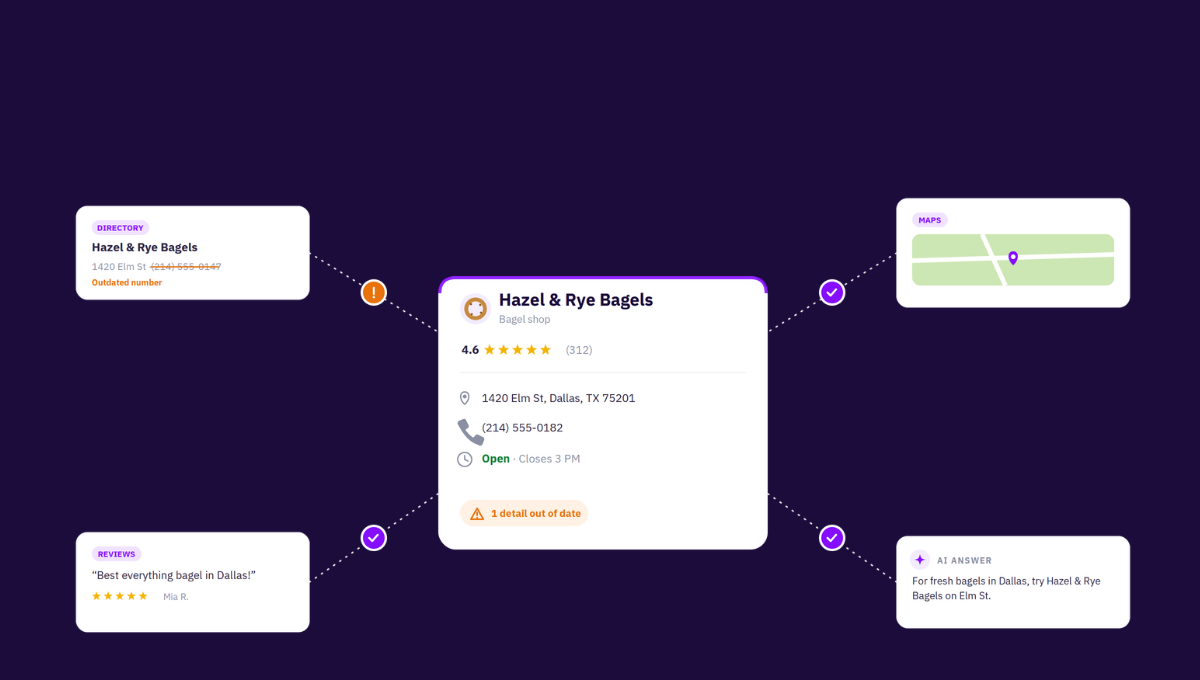
Your business name, address, phone number (NAP), hours, description, and primary or secondary categories need to be identical across every directory, including Apple Maps. Even small discrepancies (think "123 Main St." vs. "123 Main Street" or a missing suite number) can confuse search systems and those Apple Maps users considering visiting your location.
"In the age of conversational search, being 'found' is no longer enough — you must be 'recommended' by AI. By partnering with Uberall, REMAX Italy is ensuring our local data is structured and verified, making every REMAX office the definitive answer for AI-driven home buyers." – Massimo Manoni, Head of Marketing at REMAX Italia
The Apple-to-AI-citations pipeline is less documented or talked about than Google Business Profile's influence. However, we know that AI systems pull from multiple sources when they recommend local businesses, and Apple Maps is one of those high-authority data sources.
Because Apple Maps serves fewer results than Google Maps, a Pho restaurant, for example, with conflicting location data is not going to make the list of ranked Asian establishments when Apple users are searching for places nearby to eat.
2. Comprehensive Place Cards
Think of your Apple Maps place card as your storefront for every iPhone user who discovers you — and richer details equal richer conversion opportunities. Especially if your details are written in a way that's optimized for voice or conversational, long-tail search (i.e. best place for Pho in San Diego).
Fill out every location profile completely — and not with brand-level detail but with quality location-specific photos, hours, operational details, and "Good to Know" attributes like the following. This isn't an extensive list at all; just some ideas of information customers will really appreciate knowing about your business straight out of the gate.
- Payment options
- Wi-Fi availability
- Accessibility information
- Pet friendliness
- Facilities and amenities
- Website links and booking links
- Parking options
Make sure these remain up to date on your Place Card. It's also worth noting that detailed place cards are expected to play a bigger role once Apple Ads arrives, so getting these in shape now means you'll be ready to get the most out of paid campaigns from day one.
{{quote}}
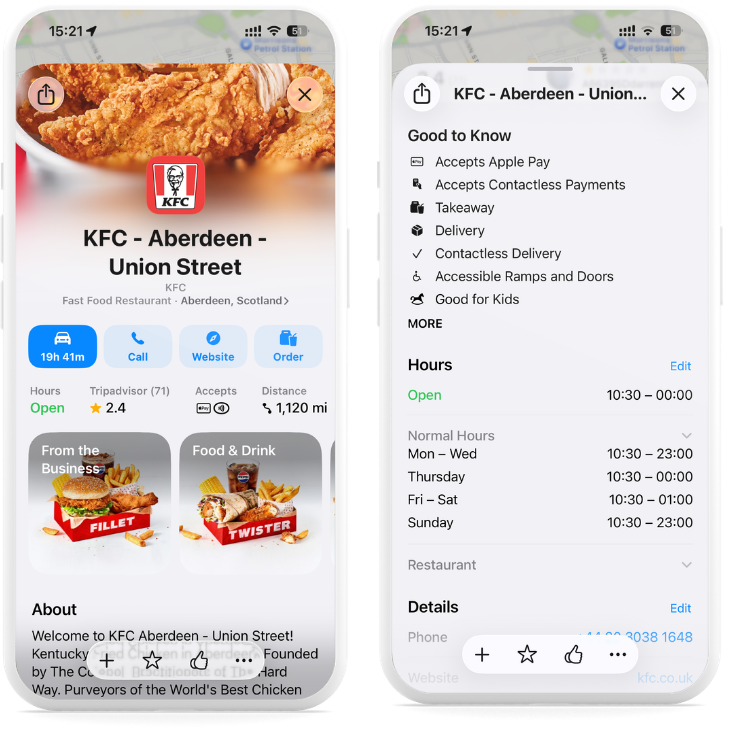
The reviews on your place card matter too — they're a ranking factor on Apple Maps and increasingly influence AI-generated recommendations. Make sure you respond to all the reviews to show potential and existing customers you care about their visits.
When most of the businesses around you are probably not updating their Apple listing (if they've even claimed it), imagine how many of the millions of local Apple users are at risk of seeing sad and stale business profiles when they search. How many potential customers will hesitate to click on that "Directions" button. They might go back and ask ChatGPT or Google or Siri — or a friend — for alternatives they can trust.
3. High-Quality Images and Showcase Promotions
Billboard advertising is still a solid format for brand awareness and authority. The image is always high quality; there's a clear CTA; passing-by consumers know exactly what's being advertised from the get-go.
Your Apple place cards and Showcases should work the same way.
Apple Business (formerly Apple Business Connect) lets you add an extra layer of brand customization by featuring your logo and a cover photo directly on the card. For multi-location brands, this is a chance to maintain visual brand consistency across every single location, something that builds recognition and trust at scale.
And your location-specific placecards and Apple Showcases should be attention-grabbing as well. Your team should upload high-quality images — exterior shots, interior ambiance, products and team. If we go back to our Phở example (and really we could be talking about service-based businesses, hotel chains, or fitness centers), these images could include entrance or outdoor areas, seating, best-selling dishes, or popular products.
Of the businesses that have actually claimed their listing, even fewer are making the most of Showcases. Like Google Posts, businesses can post about any updates, including promotions, limited-time offers, and announcements — these are displayed directly on your place card, with a call to action, for up to 30 days.
The savviest businesses already active on Apple Maps drive more foot traffic and online bookings by posting timely, relevant content right where customers are making decisions.
- New menu items
- Seasonal deals
- Local events
- Special offers
- Testimonials
- FAQ answers
If you're already running promotions through Google Posts, think of Showcases as the Apple equivalent — except with far less competition for attention.
4. Scale Across All Locations
Apple Business listings are free, but the resources needed to maintain them across every location are not. And for multi-location brands, the real challenge isn't optimizing one listing — it's doing it consistently across dozens, hundreds, or thousands of locations without losing accuracy or brand consistency along the way.
But the benefits of overcoming this challenge are pretty clear.
REMAX Italia recorded a 131% increase in views on Apple and a 21% rise in clicks across the Apple ecosystem year on year after rolling out Apple Business across its network of nearly 400 locations with Uberall. By managing and syncing listings through one platform instead of individual Apple accounts, the company could control location-specific updates at scale — without operational friction or stale profiles losing customer trust.
Whether it's 400 or 40,000 locations, managing Apple listings through the same centralized platform you use for Google and other directories removes a lot of operational headache — and ensures location-specific content goes live without compromising brand consistency. It's also worth working with a trusted Apple partner, so you get access to new features or support with platform changes and technical issues as the Apple ecosystem grows.
5. Monitor the Results
Apple Business and local analytics platforms provide your Apple listings analytics; metrics such as total views, interactions, taps on locations, and search queries are worth checking regularly.
Above everything else, it's so important to add custom action links to your Apple place card to drive customers to take actions with as little effort as possible when they land on your listing. These actions could be booking a reservation, ordering food, visiting the website, scheduling an appointment — anything that will help you drive customer revenue at that location.
Without this, measuring revenue impact from your optimizations will be near impossible. And I don't think your execs would be happy to hear that.
You should also track the number of taps on your location in search results for each specific location and, crucially, understand what customers were searching for before they tapped.
This tells you whether people are finding you by brand name, category, or other keywords — insight that can shape both your listing optimization and broader local marketing strategy. For example, the team we work with at KFC UK & Ireland found that 94.7% of searches for their locations were for the KFC brand name directly. If you know that's you, you know that's a high-intent audience already looking for your locations — which makes it even more critical that the Apple Maps listing they land on has accurate hours, up-to-date menus, and working action links.
Because at that point, the only thing standing between a search and a sale is friction.
Should I Add My Business to Apple Maps?
Apple Maps will display your business information regardless of whether you claim your profile. You need to be the one directing the right narrative by claiming and optimizing your listings across the Apple ecosystem — otherwise Apple's system will do it for you.
But because so many businesses are overlooking Apple's potential, every improvement you make now to your Apple listings — accurate data, rich place cards, quality imagery, active Showcases — will amplify your business in a low-competition environment where showing up properly is still a differentiator.
And of course, optimizing your Apple Business listings alone won't single-handedly put you at the top of local search results or AI-generated recommendations. Listing performance depends on how your locations are managed across ecosystems.
But imagine what a 20% increase in clicks to your location through Apple Maps could do in terms of your overall foot traffic and extra revenue.
That's a whole lot of extra customer conversion potential without a whole lot of extra work, if you already have the right listings management strategy in place.



1,800 brands trust us to stay visible
— not just show up once or twice in local search.




Frequently asked questions
Apple doesn’t publish exact Apple Maps usage, but the reach is large: Apple Maps is the default navigation app on more than 2.5 billion active Apple devices worldwide, and holds roughly a quarter of the US mobile-navigation market. There are over 150 million active iPhones in the US alone — all defaulting to Apple Maps — so it’s far from a niche audience.
You get your business on Apple Maps by claiming it in Apple Business (formerly Apple Business Connect), Apple's free tool. Sign in with an Apple ID at the Business Connect site, verify your business, then claim each location and complete its place card — name, address, hours, categories, and photos. For multi-location brands, a listings platform or Apple partner lets you claim and sync every location at once.
You update your business information on Apple Maps in Apple Business (formerly Apple Business Connect): sign in, open the location, and edit its place card — address, hours (including holiday hours), phone, categories, and attributes. Apple reviews changes before they go live. For brands managing many locations, syncing updates through a listings platform keeps every Apple Maps listing accurate at once.
Apple Maps gets its business data mainly from Apple Business (formerly Apple Business Connect) — the profiles businesses claim and manage — plus Apple’s own mapping data. It historically pulled from third parties like Yelp, Foursquare, and TomTom; Apple is moving away from those as information sources, though Yelp photos and reviews still appear on place cards. Claiming your listing is the best way to control what Apple shows.
Yes, you can add photos to your Apple Maps listing through Apple Business (formerly Apple Business Connect). Upload location-specific shots — storefront, interior, products, team — plus a logo and cover photo, and add images to Apple Showcases that highlight offers or updates. High-quality, current photos make your place card more compelling and can lift engagement and directions clicks.
Yes, your business can appear on Apple Maps even if you don’t claim it, because Apple builds listings from its own data sources. The catch is that an unclaimed listing may be incomplete or outdated, and Apple controls the narrative. Claiming it in Apple Business lets you correct the details, add photos, and decide how your business shows up across Maps, Siri, and Wallet.
Yes, you should add your business to Apple Maps. Apple shows your information whether or not you claim it, so claiming lets you control accuracy, imagery, and how you appear across the Apple ecosystem. With most competitors not yet active, optimizing now wins visibility in a low-competition space — brands have seen up to 20% more clicks after optimizing their Apple listings.
Yes, Apple Maps business listings are free. Claiming and managing your listing through Apple Business (formerly Apple Business Connect) costs nothing, just like a Google Business Profile. The only real cost is the time to keep every location accurate and optimized — which is why multi-location brands often manage Apple listings through a listings platform to do it at scale.
Apple doesn’t publish exact Apple Maps usage, but the reach is large: Apple Maps is the default navigation app on more than 2.5 billion active Apple devices worldwide, and holds roughly a quarter of the US mobile-navigation market. There are over 150 million active iPhones in the US alone — all defaulting to Apple Maps — so it’s far from a niche audience.
You get your business on Apple Maps by claiming it in Apple Business (formerly Apple Business Connect), Apple's free tool. Sign in with an Apple ID at the Business Connect site, verify your business, then claim each location and complete its place card — name, address, hours, categories, and photos. For multi-location brands, a listings platform or Apple partner lets you claim and sync every location at once.
You update your business information on Apple Maps in Apple Business (formerly Apple Business Connect): sign in, open the location, and edit its place card — address, hours (including holiday hours), phone, categories, and attributes. Apple reviews changes before they go live. For brands managing many locations, syncing updates through a listings platform keeps every Apple Maps listing accurate at once.
Apple Maps gets its business data mainly from Apple Business (formerly Apple Business Connect) — the profiles businesses claim and manage — plus Apple’s own mapping data. It historically pulled from third parties like Yelp, Foursquare, and TomTom; Apple is moving away from those as information sources, though Yelp photos and reviews still appear on place cards. Claiming your listing is the best way to control what Apple shows.
Yes, you can add photos to your Apple Maps listing through Apple Business (formerly Apple Business Connect). Upload location-specific shots — storefront, interior, products, team — plus a logo and cover photo, and add images to Apple Showcases that highlight offers or updates. High-quality, current photos make your place card more compelling and can lift engagement and directions clicks.
Yes, your business can appear on Apple Maps even if you don’t claim it, because Apple builds listings from its own data sources. The catch is that an unclaimed listing may be incomplete or outdated, and Apple controls the narrative. Claiming it in Apple Business lets you correct the details, add photos, and decide how your business shows up across Maps, Siri, and Wallet.
Yes, you should add your business to Apple Maps. Apple shows your information whether or not you claim it, so claiming lets you control accuracy, imagery, and how you appear across the Apple ecosystem. With most competitors not yet active, optimizing now wins visibility in a low-competition space — brands have seen up to 20% more clicks after optimizing their Apple listings.
Yes, Apple Maps business listings are free. Claiming and managing your listing through Apple Business (formerly Apple Business Connect) costs nothing, just like a Google Business Profile. The only real cost is the time to keep every location accurate and optimized — which is why multi-location brands often manage Apple listings through a listings platform to do it at scale.