9-Step-Plan: How to Complete Your Google Business Profile
A complete Google Business Profile gives you prime online search results space for free. Here’s your guide to use its full potential!



Both single- and multi-location businesses can attract significant numbers of local customers through a Google Business Profile (GBP), formerly Google My Business (GMB), as it leverages the power of local search engine optimization and Google Maps. However, unless your local business listing is complete, Google will not display it at its full potential in many local searches.
Boosting Local SEO With an Optimized Google Business Profile
The rumor is true: your local business can gain prime online search results space for free through Google Business Profiles. And you might remember from our local SEO statistics blog article that:
- 87% of customers use Google to evaluate local business.
- 42% of local searches result in clicks on the Google 3-Pack.
- 400% more “open now near me” searches in recent years.
Particularly for offline brick-and-mortar businesses, Google has made it easy to benefit from local SEO quickly and efficiently—because the map pack pushes organic search results down, showcasing your business above them.
Why Does Profile Completeness Matter?
The short answer is: both search engines and customers love complete business profiles because they’ll find exactly—and everything—they’re looking for.

Our study shows that the top 10% most accurate locations had 18x higher search visibility than the least accurate locations—and increased visibility means more eyes on your business as a prerequisite for any conversion.
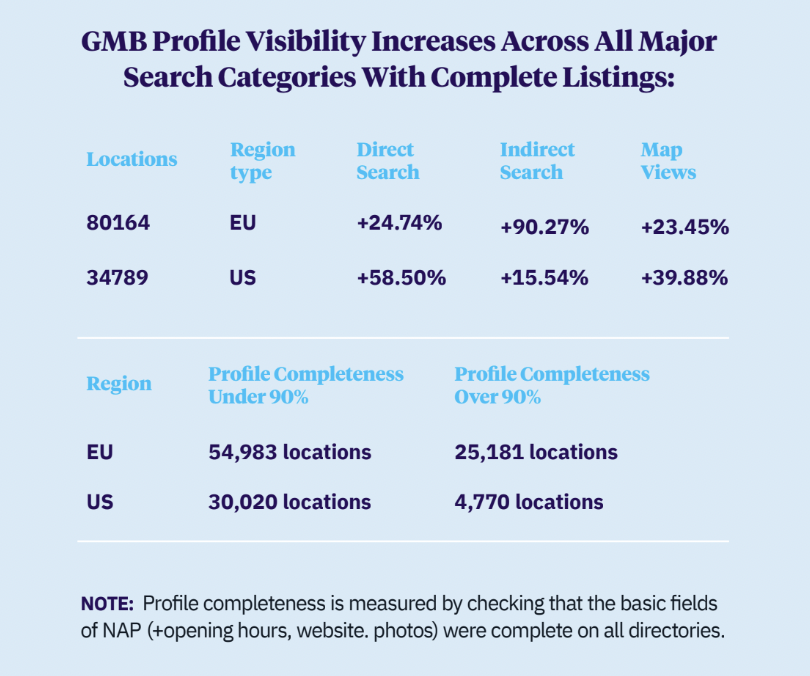
Besides visibility in direct and indirect searches (including Google Maps), a complete Google Business Profile allows your customers to interact with you–because they can just click on directions, your phone number, or your website.
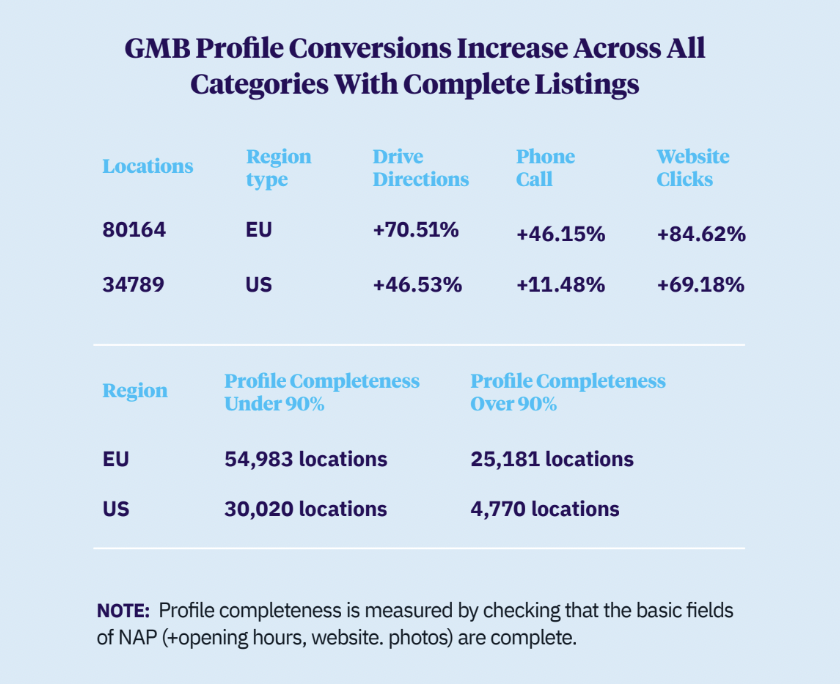
Moreover, Google found that customers are 2.7 times more likely to consider a business reputable if its GBP is complete, and 70% more likely to visit and 50% more likely to consider purchasing from businesses with a complete Business Profile.
How to Complete Your Google Business Profile
For an incomplete listing, Google will guide you through several essential steps: adding your NAP data, services, photos of your business and so on. But first of all, you have to find or create a GBP.
To find or create a Google Business Profile, sign in to your Google Account or create one using your business email. Then go to the profile creation page, enter your business name, and select it if it appears in the suggestions.
- If someone else has verified your business already, request ownership (and if there isn't a "Claim this Business" or "Own this business" link, you might already be an owner, indicated by a “You manage this business profile” badge on your profile). Fill out the form, click Submit, and the current owner will receive an email to contact you, with a confirmation email sent to you.
- If no one has verified your business yet, create a profile. Enter your business category, decide if you have a storefront, and provide your business address or service area accordingly. Add a phone number and website URL, then click “Finish”, and choose a verification option to complete the process.
Below your newly claimed or created Google Business listing, you will then see a slider containing a row of boxes.
- The first box takes you to the wizard who guides you through your profile set up.
- The second box takes you to the editor where you can add data on your own.
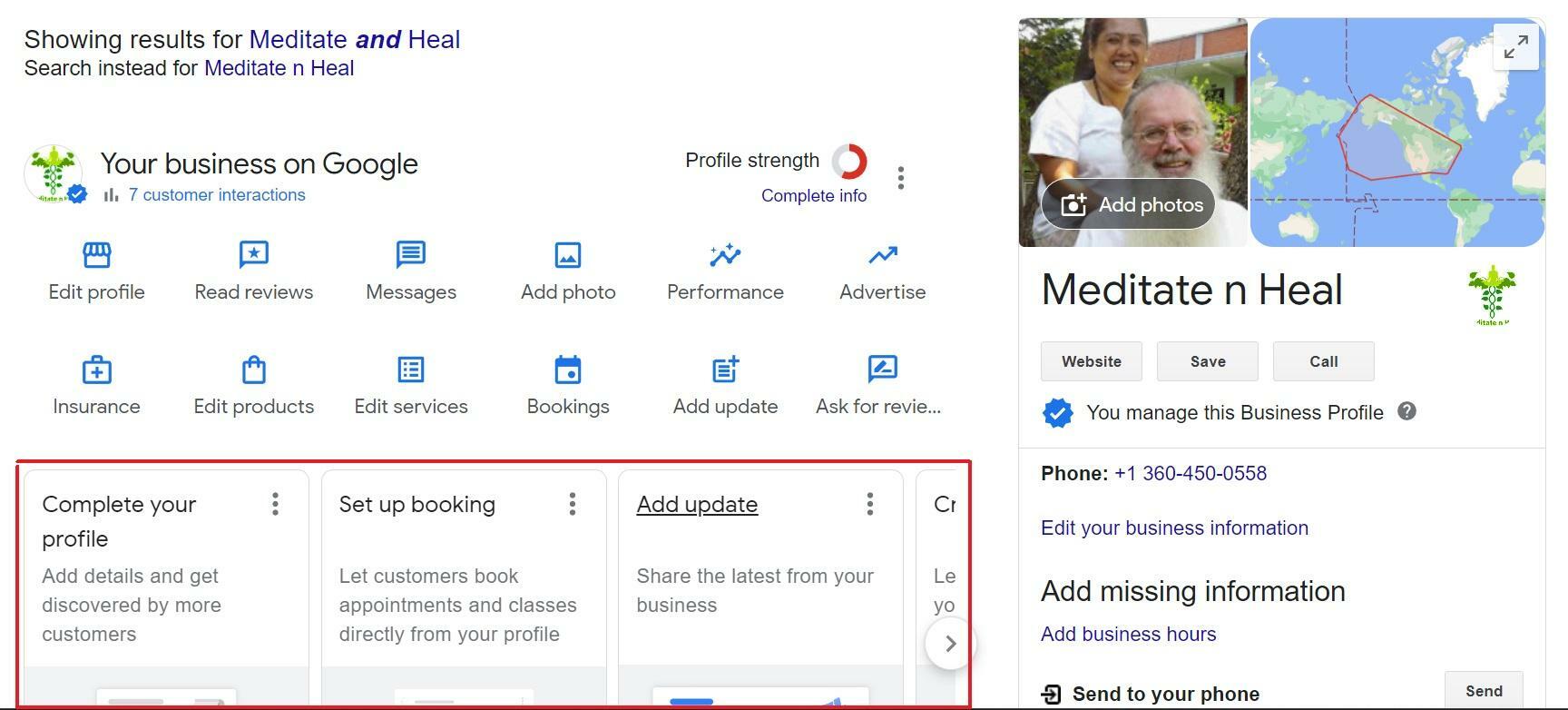
Once your GBP is complete and verified, your business may appear just below paid ads and above organic search results for users searching with local intent using "near me" and location-based keywords. So let's jump into the critical work ahead.
#1 Enter Your NAP Data
Accurate location data is essential for ensuring that customers can easily find and contact your business. Ensure that your business name, address, and phone number are correctly listed and consistent with the information on your website and other platforms.
In addition to entering these details during the initial setup, it’s important to regularly review and update them to maintain accuracy and provide a seamless experience for your customers.
#2 Add Your Opening Hours
Arriving at a business only to find it closed is incredibly frustrating for customers–but you can avoid this (while serving your SEO) by posting your opening hours
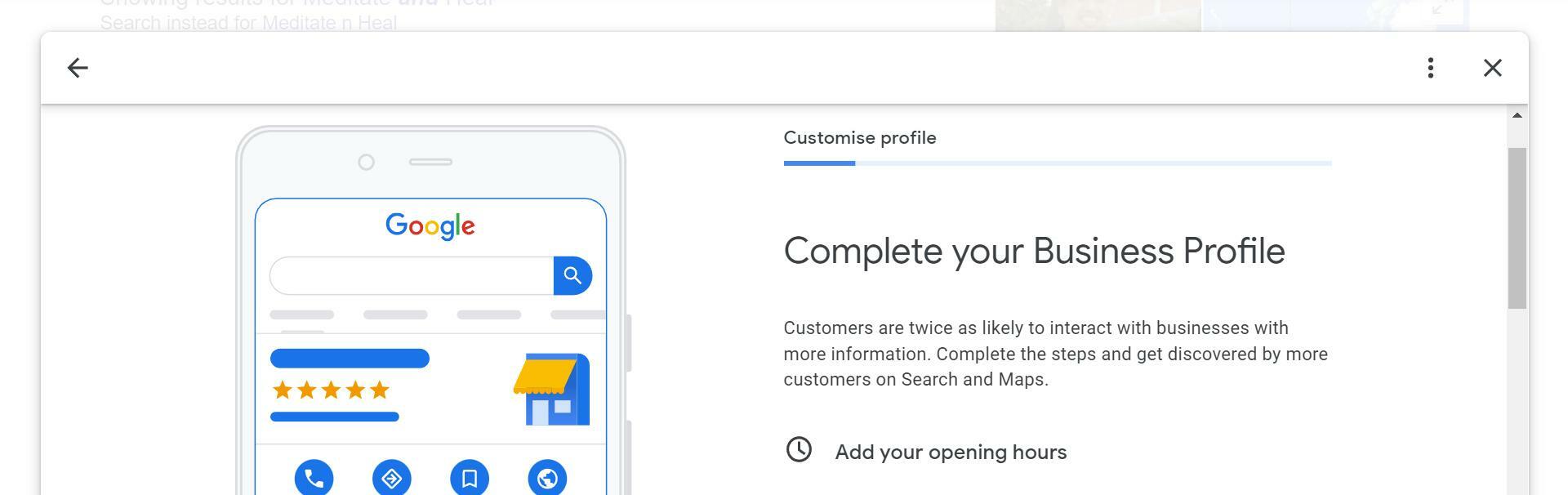
Clicking the "Add your opening hours" tab takes you to the business information editor. Scroll down to the "Hours" section and select the first option, "Open with main hours." You can set hours for each day of the week and unique options like hours for the elderly, pickups, deliveries, breakfast, dinner, or holiday seasons with primary, special and more hours.
#3 Choose Categories & Attributes
To effectively showcase your business and attract the right customers, it’s crucial to select the appropriate categories and attributes for your Google Business Profile. Categories help Google understand and categorize your business, enhancing its visibility in relevant searches.
Attributes, on the other hand, offer additional details about your services and features, which can influence customer decisions. Regular updates to these selections (by you and Google, pay attention) ensure your profile maintains its relevance.
#4 Set Up Booking Options
Most businesses can take bookings directly in their GBP without redirecting customers to their websites. If you see the "Set up booking" tab, you're eligible to integrate with a third-party booking service provider. This integration is straightforward and opens up new opportunities for customer engagement and convenience.
#5 Add Photos
Photos and videos bring your GBP to life, attracting more clicks, establishing trust, helping customers find your business with exterior images, and showing them what to expect when they arrive with walk-through series or videos.
Specifically, you can upload a logo that identifies your business, a cover photo that displays on your GBP, and general images that tell your story. Be sure to follow Google's image guidelines though: photos should be in JPG or PNG format, 10 KB to 5 MB in size, with a minimum resolution of 720 × 720, without altering filters. Video requirements are less than 30 seconds in duration, under 100 MB in file size, and with a minimum resolution of 720 px.
#6 Display Products & Services
A well-curated display allows users to quickly grasp what your business has to offer and how it aligns with their needs. This not only enhances your profile’s attractiveness but also boosts your visibility in search results. Keeping your product and service listings up-to-date ensures that customers always see the latest information and offerings.
#7 Publish Google Posts
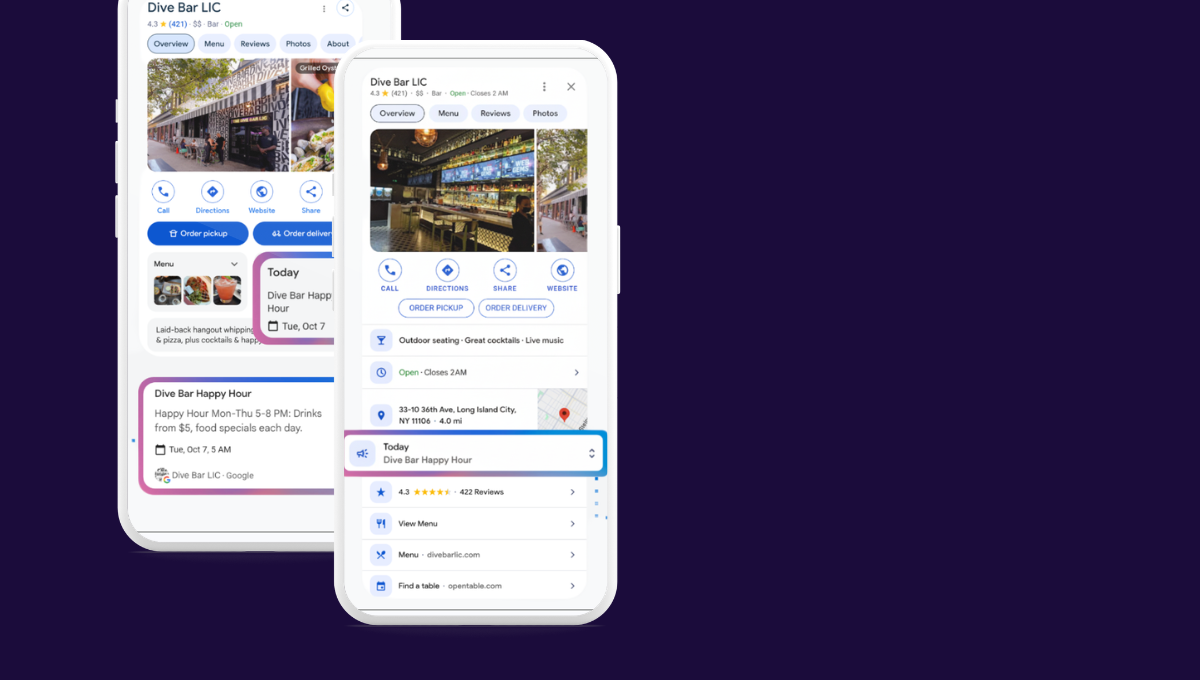
Google posts appear prominently in search results and can significantly boost customer interaction and drive more traffic to your website. Regularly updating these helps maintain an active presence and keeps your audience engaged with fresh, relevant content.
A heads-up: you can write a post up to 1,500 characters long and include images and a link. For new products, insert a link directing customers to your stores; and for events, include the event title, description, start/end date or time.
#8 Get Reviews
(Electronic) Word of mouth remains one of the most effective forms of advertising, because people trust recommendations from friends—or other consumers—way more than from businesses.
More positive reviews translate into more sales and higher search engine rankings; and Google actually makes it easy to start collecting online reviews: click on the "Get your first reviews" tab, copy the link Google gives you, and start sharing it with your friends and best customers. But remember to follow Google's rules when soliciting reviews to avoid restrictions on your profile: you cannot offer any rewards in exchange for reviews, your GBP must be verified, and you need to be on Google Maps.
#9 Monthly Performance
Monitoring your GBP performance, lastly, provides valuable insights into how effectively your profile is engaging with potential customers. By analyzing metrics such as calls, messages, and website clicks, you can gauge the impact of your profile and identify areas for improvement. These performance insights help you make informed decisions about optimizing your profile and adjusting your strategy.
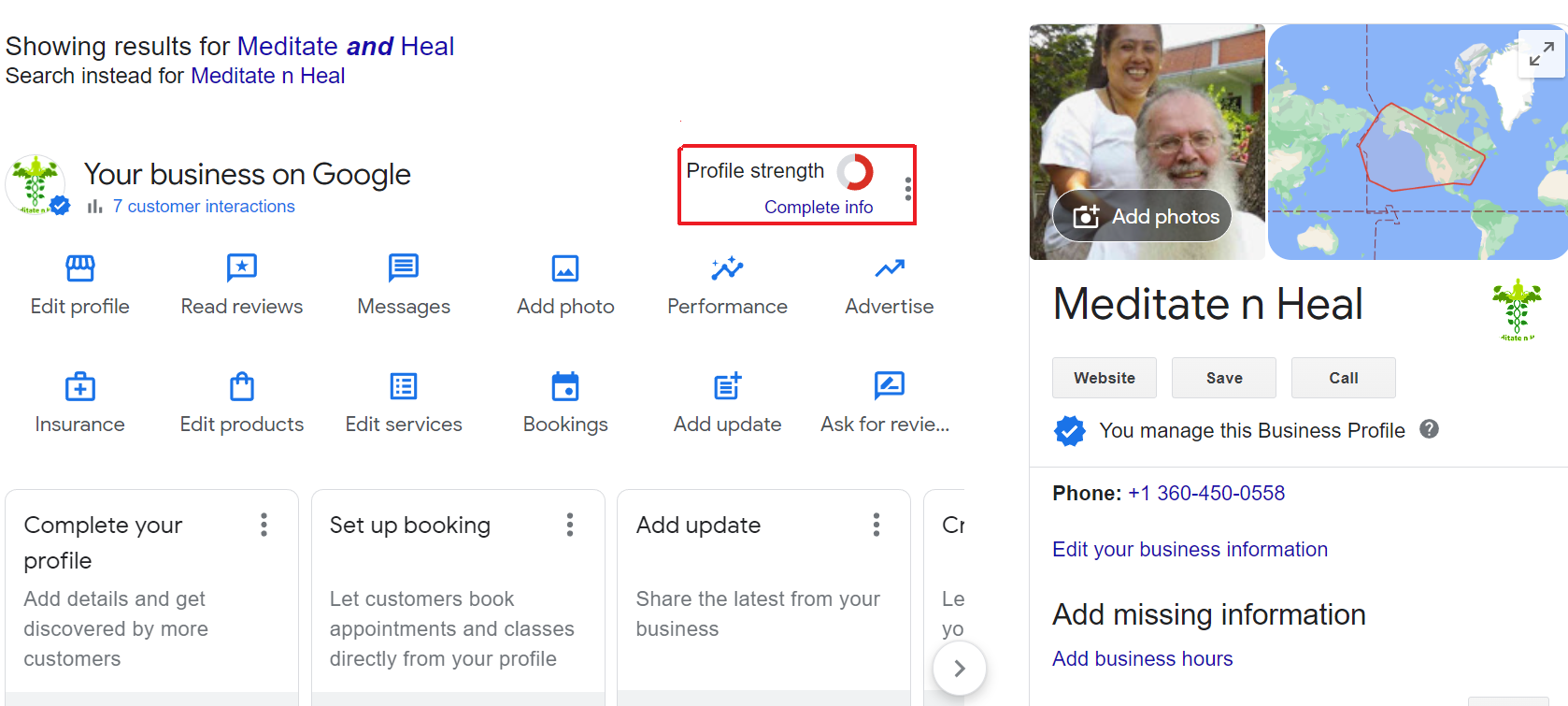
Moreover, the Profile Strength Indicator helps you identify and fill in missing info while making sure that your profile is consistent across Google products and services.
- If the circle is complete and green, your profile is fully optimized and complete–you’re in the clear.
- If the circle is partially complete and yellow, your profile is somewhat complete but still requires additional information to be fully optimized.
- If the circle is complete and light green, your profile is nearly complete with just a few minor details remaining to achieve full optimization.
- If the circle is only half complete and bright red, there’s (much) work needed to complete and optimize your GBP.
Ready, Set, Go: For All Locations?
Managing GBP for multiple locations can be a complex and time-consuming task. However, there’s location marketing tools like Uberall to simplify data maintenance.
Uberall helps you maintain accurate location data across the most important online directories—including GBP and, most importantly, at scale. In other words: you can manage all your profiles for all your locations on a single platform!
Additionally, Uberall provides valuable analytics and performance insights to track key metrics and optimize your local SEO strategy. Reach out to our team if you want to know more about our listing management solution.


1,800 brands trust us to stay visible
— not just show up once or twice in local search.